Small Scripts, Big Data: Keeping your Patchworks projects under control with Git and DVC
Every result your Patchworks project has ever produced, traceable to the exact scripts and data behind it. Git tracks your small, fast-changing scripts, DVC handles the huge datasets Git cannot, and together they mean no lost edits and no unanswerable questions.
The folder we all recognize
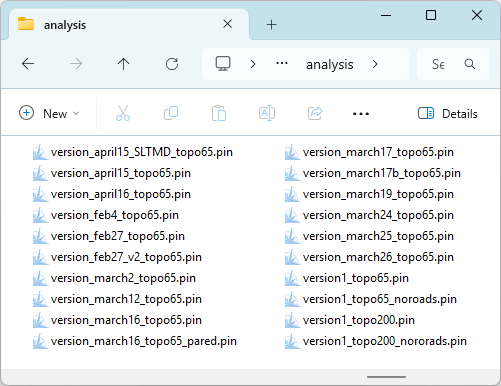
Open any modelling project that has been active for more than a few months, and you will likely encounter files named scenarioSet_final.bsh, scenarioSet_final_v2.bsh, scenarioSet_final_v2_FIXED.bsh, along with a folder titled data_old_dont_delete that no one dares to touch.
This system works, more or less, until someone asks an inconvenient question: Which inputs generated the numbers in the base case scenario? What did we change between the scenario that looked right and the one that didn't? Can we get last Tuesday's version back?
Sharing the folder introduces a second issue. When two people open the same script on a network drive, each makes changes and saves. The last person to save silently overrides the other's edits.
No one is warned about this loss. It may go unnoticed until a result looks wrong, and by then there is no telling what the missing change was. Teams often resort to messages like "don't touch the base case, I'm in it", which only works until someone misses the warning.
The third problem is the dead end. You may spend an afternoon reworking a scenario, modifying a dozen files along the way, only to realize that the approach will not work. Getting back to where you started means remembering every edit and undoing each one by hand, and hoping you haven't missed any.
Version control exists to address all three issues. Instead of saving copies with ever-longer names, you keep one set of files and record a snapshot each time you reach a significant milestone. Each snapshot provides you with:
A record of what changed, down to the individual line in a script.
A note saying why, written by you at the time, when you still remembered.
A way back, so any earlier state of the project can be restored in seconds.
Freedom to experiment, because nothing you try can destroy what came before.
For a team, version control also transforms how files are shared. Instead of everyone editing one set of files in a shared folder, each person works in their own complete copy of the project.
Git coordinates these copies, sharing each person's commits with the others and merging changes made to different parts of the same file. If two people modify the same lines, Git pauses and asks which version to retain.
DVC does the same job for large datasets, ensuring that every copy can be brought to the same known state. Changes are never silently overwritten, as each modification is recorded as a commit from a named individual.
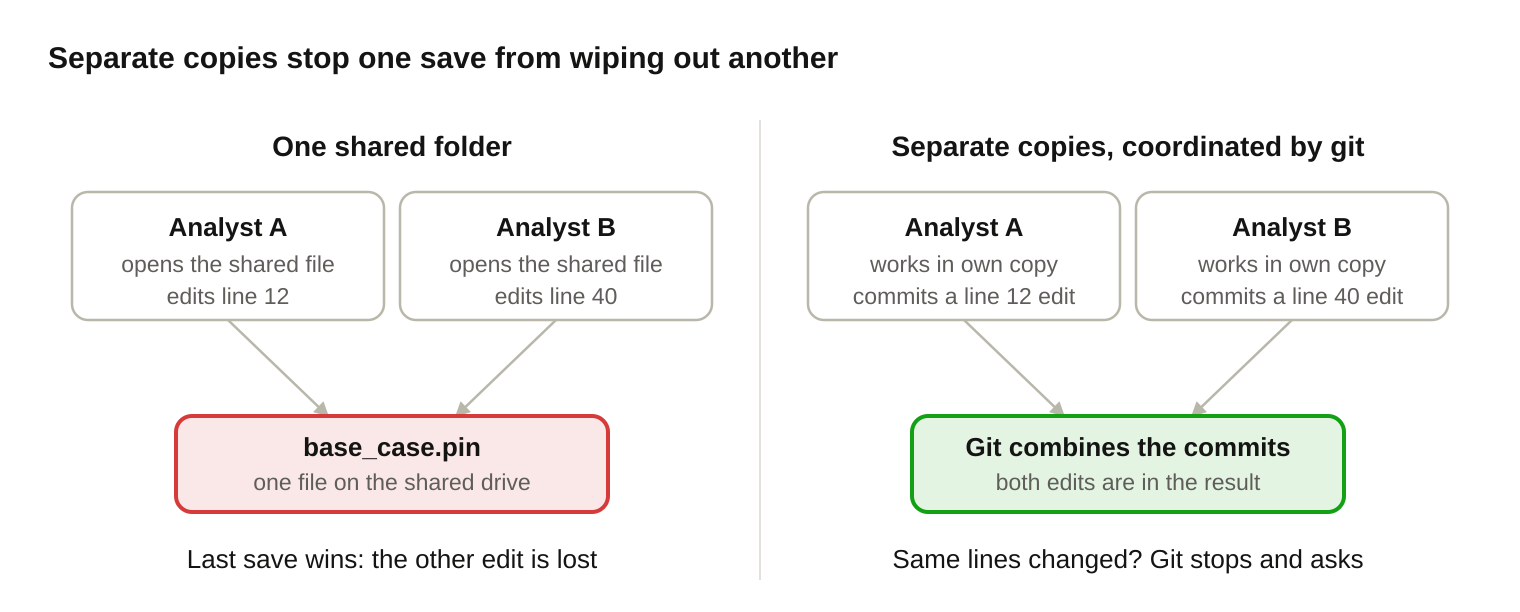
On the left, two individuals save to one file, with the second save erasing the first. On the right, each commits in their own copy, and Git merges the two changes together.
Why git?
Git is the version control system adopted by most of the software world, and it suits modelers for the same reasons it suits programmers.
Programmers encountered the issue of overwriting files first, and on a much larger scale. Git was created in 2005 by Linus Torvalds to manage the Linux operating system, a codebase that thousands of developers change simultaneously. Since then, it has become the standard tool for software projects of all sizes.
This history is relevant to modelers. The update problem described above has already been solved and tested under far heavier use than any modeling team will ever subject it to. A folder of control scripts is, as far as git is concerned, a small and well-structured codebase.
It is free and runs everywhere. Windows, Mac, and Linux are all supported, and there is no licensing fee.
It operates on your own machine. The entire history resides in a hidden folder within your project. You do not need an account, a server, or an internet connection.
Every copy is a full copy. If a colleague copies the project, they receive the complete history as well. This is what "distributed" means, and it effectively serves as a backup.
It is excellent with text. PIN files, report scripts, target descriptions, and scenario sets are all text-based. Git shows exactly which lines have changed between any two snapshots.
Branches make what-ifs inexpensive. You can experiment with a new scenario on a side branch and then keep it or throw it away without disrupting the main line of work.
The workflow is straightforward. You edit your files as usual, and when you reach a sensible stopping point, you "commit." A commit is a snapshot accompanied by a brief message, such as "Implement VQO targets".
A common misconception is that Git refers to GitHub. GitHub is just one platform that hosts Git projects. Git itself operates on your laptop or the office file server.
Where git runs out of road
Git was designed for text files measured in kilobytes. However, Patchworks projects also carry inventories and other spatial layers, large yield curve files, and scenario output meaasured in megabytes and gigabytes, which Git struggles to handle.
Git retains every version of every file indefinitely in each copy of the project. A 5 GB dataset that has been updated four times results in approximately 20 GB of history on each person's disk. Performance slows down, and Git cannot show you what changed inside a binary file anyway.
The usual workaround is to instruct Git to ignore the data and only version the scripts. This leaves half the project untracked. You may be able to restore the script from last March, but you cannot easily determine which version of the dataset it ran against.
What DVC adds
DVC (Data Version Control) is a free, open-source tool designed to complement git by managing large files. It was originally built for machine-learning teams, but the problem it addresses is precisely that of modelers.
A coat check serves as a fitting analogy for how this system operates. You hand over a large file to DVC, which stores it securely and returns a small ticket, essentially a tiny text file that contains a unique fingerprint of the data.
Git versions the ticket, which is easy because the ticket is small and in plain text. DVC keeps the original file (the "coat"). When you want to access an old snapshot, git restores the old ticket and DVC uses it to fetch the matching data.
| Git | DVC | |
|---|---|---|
| Looks after | Scripts, parameter files, DVC's tickets | Large datasets and results |
| Suited to | Small text files that change often | Big files that change occasionally |
| History kept in | The project folder itself | A storage folder you choose |
| Shows what changed | Line by line | Only that the file is different |
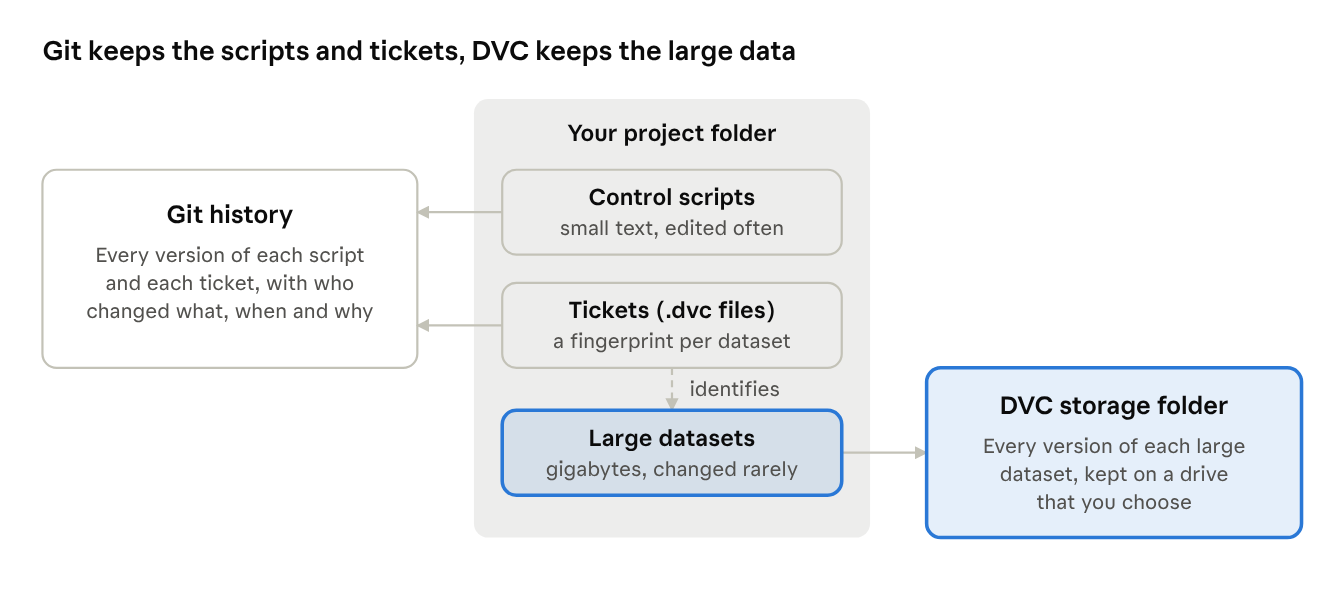
The scripts and tickets are stored in Git's history, while the large datasets are kept in the DVC storage folder, with each ticket identifying its corresponding dataset.
What's in it for you?
The combination of git and DVC is beneficial even if you are the only person who ever touches the project. For a team, these practices address an additional set of challenges.
Working on your own
An undo that reaches back months: You can restore any earlier state of a script or dataset long after your editor's undo function has forgotten it.
Results you can reproduce: By tagging the snapshot used to create a scenario, you can rebuild the exact scripts and data that produced it whenever a question comes back.
Room to experiment: You can try risky changes on a branch. If they fail, you can switch back without losing anything.
A project diary you didn't have to write separately: The list of commit messages is a dated record of what you did and why.
One tidy folder: There is a single current copy of each file, while older versions are kept out of sight in the history.
Easy moves between machines: Transferring the project to a laptop requires just a clone and a dvc pull, ensuring both machines hold the same data.
Working as a team
Everyone runs against the same data: A dataset's ticket identifies one exact version. "Which inventory do you have?" is answered by comparing a fingerprint.
A record of who changed what: Every commit carries a name, a date, and a reason, so a surprising result can be traced to the change that caused it.
Parallel work without overwriting: Multiple people can edit scripts simultaneously, and Git will merge their changes. If conflicts arise from edits to the same lines, Git will prompt users to decide which changes to keep.
Old data versions are stored once: The shared storage folder holds the history. Each person's disk needs only the versions they are working with.
Review becomes practical: Checking a colleague's change means reviewing just the few lines that differ, which is far quicker than comparing two entire folders.
Faster onboarding and safer handovers: A new team member can access the complete project and its history with just two commands. When someone leaves, their reasoning remains in the commit log.
Datasets have one additional rule for the team. While Git can merge two people's edits to a text file, it cannot merge two modified copies of a binary dataset. Agree on who will update each dataset, and have everyone else pull the new version.
Discipline that pays off
It can be tempting to dive straight into an analysis project and let it evolve organically. Creating a folder here, copying a script there, and the work gets done. For a brief task that no one will revisit, this approach may suffice.
Modeling projects are rarely like that. They can run for several years, and results may need to be referenced a decade later by staff who were not involved when the work was completed. At that point, the only record of what was done and why will be whatever the project documented about itself.
Organizations that establish some discipline from the outset tend to find it pays off in a big way. The practices outlined in this article and its companion guide require little from each individual on a daily basis. Over the life of a project, they add up to a complete, ordered record that outlasts any individual's memory.
The link to recognized quality practice
None of this is unique to software. Formal quality management calls for the same principles in more general terms. ISO 9001, the international standard for quality management systems, expects an organization to control its documented information and to identify and trace its deliverables. ISO 10007, its companion guideline on configuration management, outlines how to achieve this: identify each item, establish baselines, control changes, maintain a status record, and ensure auditability.
Git and DVC provide a practical means of doing exactly that for a modeling project.
| What quality practice asks for | How git and DVC provide it |
|---|---|
| Identification: know exactly which version of each item was used | Every snapshot has a unique ID, and every dataset has a fingerprint |
| Baselines: agreed reference states of the work | Tags such as march-2026-baseline |
| Change control: each change recorded and attributable | Commits, each with an author, a date, and a reason |
| Traceability: connect a deliverable to the inputs behind it | One tagged snapshot links the scripts and data together |
| Audit: show a reviewer what was done | The log, and the ability to restore any past state |
| Retention: keep the record safe over time | Full history in every copy, plus a backed-up storage folder |
Guidance written for analysts supports this approach. Published good-practice guides for scientific computing and government recommendations on quality-assuring analytical models both advocate for version control as a fundamental habit.
A defense when questions are asked
For a firm that provides professional advice, this record holds additional value. If a result is challenged years later, the useful answers include what was known at the time, which data and assumptions were used, who made each change, and whether the work was reviewed. A firm that can produce those answers from its own records is in a much stronger position than one that must reconstruct them from memory.
Version control does not prevent mistakes, nor is it a substitute for checking the work. What it offers is evidence of a careful, repeatable process, and a method for quickly identifying and correcting an error once it is suspected. Firms that carry errors and omissions coverage may need to elevate their practices to this level, and their insurer or legal adviser can specify what records are expected.
Patchworks is built for this
Version control can only track a model that is made of files it can read. Some modeling tools keep the model definition inside one binary project file or a database, or in settings made by hand in dialog boxes. Git can store a file like that, but it cannot show what changed inside it or merge two people's edits. Cloud-based systems are a bigger problem, where you don't even have free access to your own data.
Patchworks takes a different approach. A model is a folder of plain files. The PIN file, the report scripts, the target descriptions, and the scenario sets are all text, so each one can be read, compared line by line, and merged.
The large inputs are ordinary files too. The block shapefile, the other spatial layers, the yield curves, topology files, input matrix, and block cache files sit in folders where DVC can fingerprint them. And because the scripting is open, a scenario can record its own provenance. The User Guide shows how to add the current commit id to the scenario metadata.
The Patchwork file-based approach was implemented with version control in mind. It follows from a design that keeps the model open and inspectable. The result is that the discipline described above is within reach of every Patchworks user, using free tools.
The payoff
With both tools in place, a single git snapshot pins down the entire project: the scripts directly and the datasets through their tickets. "Which inputs produced the BAU_MartenHigh scenario?" transitions from a guess to a matter of executing two commands.
The cost involves adopting a handful of new habits and creating a storage folder on a drive you already own. Start with one project, tag the scenarios that matter, and the _final_v2_FIXED files can be retired.
Consult the A working guide to Git and DVC chapter in the User Guide for details covering the setup and the day-to-day commands.
For an organization that wants that discipline without a great deal of ceremony, version control is just the ticket.