Working with Enterprise Data: OGR Support in Patchworks
If you have opened the Open Layer dialog lately, you may have noticed a new entry point for OGR data sources alongside the familiar shapefile: GeoPackage files, ESRI file geodatabases, and layers residing in PostgreSQL databases. For anyone working with enterprise GIS data, this opens the door to using the organisation's live data directly, without first exporting it to shapefiles.
Getting there took more than teaching Patchworks to read those formats. Two properties of enterprise data had to be addressed along the way. A new feature called the block cache provides the solution.
Why OGR support matters
The shapefile has been a faithful workhorse for thirty years, but it shows its age. It caps out at 2 GB per file, limits column names to ten characters, and treats dates as plain text. Modern enterprise formats were built to solve exactly these problems: GeoPackage and file geodatabases carry real date types, long descriptive column names, and effectively unlimited file sizes, and databases go further still, serving data to many users across an organization at once.
So why not simply read them directly, the way a shapefile is read? Because enterprise data comes with enterprise problems.
The first is consistency. An OGR data source can change underneath you. Another analyst can edit the database while you are working, so the data behind row 500 of your table might not be the same data by the time you reach row 5,000. A map drawn from a moving data set is hard to trust.
The second is concurrency. The OGR library itself is not safe to use from many threads at once, while Patchworks routinely works on a table from several directions at once: drawing the map, scrolling the table, running a selection.
The block cache: a snapshot you can trust
The new block cache solves both problems in the same way: with a snapshot. The first time you open an OGR layer, Patchworks reads it from beginning to end exactly once and writes the contents into a private cache directory in a compact format of its own. Every subsequent read (every cell displayed, every geometry drawn, every spatial selection) comes from that snapshot and never goes back to the source.
That snapshot is completely read-only. It cannot be edited, and it never tries to push changes back. This is precisely what eliminates the multi-threading issues: many parts of the application can read the same table at once, safely and without interfering with each other.
And it is fast. Reading a large table the old way meant fetching each value individually from the source. With the cache, full-table scans that used to take tens of seconds complete in a fraction of a second. Our benchmarking shows improvements on the order of a hundredfold or more, and reopening a cached layer is nearly instantaneous. The one-time cost of building the cache is modest: it only takes a few seconds for a quarter-million-feature layer.
The cache field in the open dialog
When you open an OGR layer, the dialog offers a cache directory field, and what you do with it shapes what happens next.
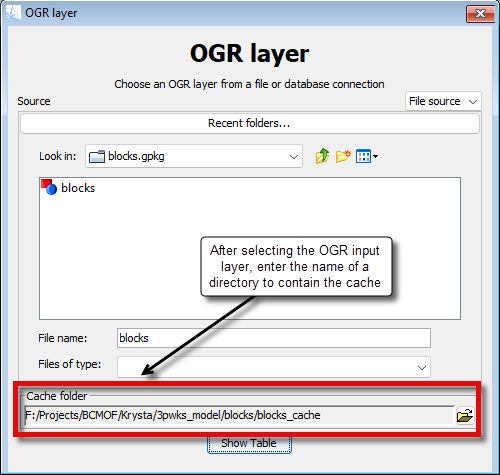
Leave it blank, and Patchworks builds an anonymous cache in the system's temporary folder. It is private to that layer, it is deleted automatically when the layer is closed, and if the application is ever interrupted before it can clean up, a sweep at startup removes the leftovers. Nothing to name, nothing to manage, nothing left behind.
Fill it in, and Patchworks builds a named cache at the location you choose. Named caches are also how you share the benefit across the toolkit: every application in the Patchworks Toolkit can open the same cache.
Consistency checks: reuse, rebuild, or refuse
A named cache is only trustworthy if it is what it claims to be, so Patchworks checks before reusing one. The cache remembers the source it was built from: the file or database connection, and the exact layer or query. When you open the cache again, the stored description is compared against the source you are opening now. Only a perfect match is reused, with no questions asked.
If the source has changed (a newer file, a rebuilt table), the cache is flagged as stale, and the choice is yours:
- reuse the existing snapshot, keeping your work anchored to the data as it was when the cache was built;
- rebuild, replacing the cache with a fresh snapshot of the source as it stands today;
- refuse, backing out without opening anything.
If the differences run deeper, for example, if the same cache name points at a different source or the same database is opened with a different query, there is no stale snapshot worth keeping, and the dialog offers the same rebuild or refuse choices instead.
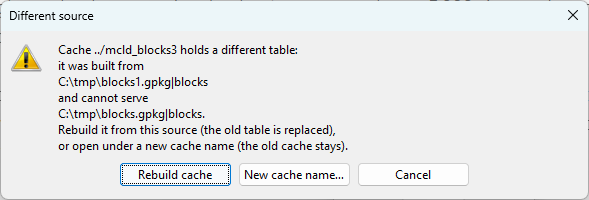
When a cache no longer matches its source, you choose: reuse the snapshot, rebuild it, or refuse to open it.
Named caches are never deleted automatically. A snapshot you may be relying on is yours to remove. To delete one manually, make sure nobody has that layer open in any session, then simply delete the folder.
A foundation for the project
If you are using OGR data sources, there is a project-level habit worth adopting: capture a named cache when a project starts and work from it for the life of the project. Every map, analysis, and report is then built on identical data, and your results are reproducible. A colleague opening the same cache sees exactly what you saw, even if the enterprise database has moved on.
The block cache is the quiet part of the OGR story, but it is what turns "can open enterprise data" into "can work with enterprise data": fast, consistent, and safe for every application in the toolkit.