A Brief Note on Garbage Collection: Trying ZGC in Patchworks
Every Java program, including Patchworks, relies on a quiet partner known as the garbage collector. As models grow larger, selecting an effective garbage collector becomes increasingly important, and Java 21 has introduced new options. This note explains the role of the garbage collector and how to switch Patchworks to the latest option.
What the garbage collector does
Java objects reside in a memory pool called the heap, and allocating memory from it is one of the fastest operations a program can perform. Objects are never explicitly deleted; instead, the garbage collector periodically scans the heap, determines which objects are still in use, and reclaims the rest. Most objects have a very short lifespan, so the collector maintains a "nursery" where short-lived objects are inexpensive to create and dispose of, promoting only the surviving objects to the long-term section of the heap.
The drawback is that safely moving or discarding objects has traditionally required pausing the entire program while the collector operates. In large heaps, these pauses can range from being unnoticeable to quite significant.
The long-time default: G1
For over a decade, Java's default collector has been G1, a capable generalist that effectively serves most workloads. However, its weakness lies in handling big memory hogs like Patchworks. Large allocations, such as multi-megabyte arrays, bypass the nursery and go directly to the long-term heap, where reclaiming them necessitates the most costly type of collection: a full stop-the-world pause. Over extended periods, these pauses accumulate, and the JVM tends to keep the heap expanded under pressure, causing Task Manager to report increasing memory usage, even when there are no memory leaks.
What ZGC changes
ZGC, which has matured as a generational collector in Java 21, adopts a different strategy: nearly all of its work runs concurrently, alongside your simulation, rather than interrupting it. The implications for a large Patchworks model are substantial:
- Pauses are reduced to microseconds, regardless of heap size, ensuring the application never visibly freezes.
- The collector automatically returns memory to the operating system when the workload decreases, allowing the memory usage to decrease as well.
In our testing with large models, we observed exactly this outcome: pause times effectively vanish, and the memory footprint adjusts according to the workload rather than continuously increasing.
We measured processor time while running the same large (10Gb) model with both collectors. Using ZGC, the model converged using approximately 40% less CPU time, even though it required slightly more iterations to reach convergence. This strongly suggests that ZGC is more efficient in memory management for this type of workload. However, since this is a single comparison based on one model and one scenario, and considering that Patchworks uses a stochastic solver, these findings are encouraging but not definitive.
How to enable it
ZGC requires Java 21 or later. To enable it, add the following two options to the Java launch parameters, located in the Application Launcher properties panel. First, right-click on the "Applications" label in the Application Launcher.

Next, enter the following JVM options into the launcher.javaflags entry:
-XX:+UseZGC -XX:+ZGenerational
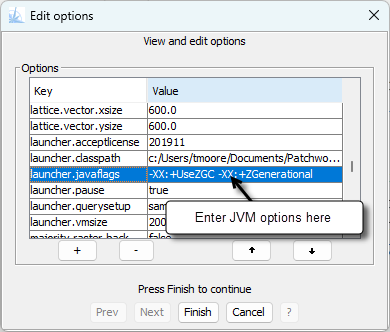
Both options are necessary: the first selects the ZGC collector, while the second enables its generational mode.
For Java 25 and beyond, generational mode is the default for ZGC, and the -XX:+ZGenerational flag is no longer required.
With these simple settings, a large model can operate for hours without freezing, and the memory it used will be released once the task is complete. If you work with large models, we encourage you to test ZGC on your own workloads and compare the results. We would be very interested to hear about your experiences.