Updating your scripts for the latest BeanShell
As of October 2026, the scripting engine has been updated to the current release candidate of BeanShell 3. This update includes numerous bug fixes and improvements, but it also removes several "relaxed" shortcuts that the previous version permitted. Although these shortcuts made scripting easier, they could also hide mistakes. The new BeanShell is more closely aligned with standard Java and will report these issues as errors.
Most scripts will run unchanged. However, if an older script now stops with an error, it is likely due to one of the four cases below. Each fix is minor.
Tip: BeanShell error messages give the line number and a copy of the code that failed (for example, at line 309 in ... near ...). Start your troubleshooting there.
1. Text is no longer converted to numbers automatically
Values read from tables and files are often text (strings), even when they look like numbers. The old BeanShell would quietly convert text such as "1234" into a number. The new version does not:
int blockNum = table2.getField("BLOCK"); // now an error
The error message will read:
Cannot cast String with value "1234" to intFix: Convert the text explicitly. Use Integer.parseInt for whole numbers and Double.parseDouble for decimal values:
int blockNum  = Integer.parseInt(table2.getField("BLOCK"));
double volume = Double.parseDouble(table2.getField("VOLUME"));
2. Use true and false where a yes/no value is required
The old BeanShell accepted certain values as "true-ish" or "false-ish". Values such as null, zero and empty text were treated as false, and anything else was treated as true. The new BeanShell requires an actual true or false.
The most common issue arises when passing null to a method that expects true or false:
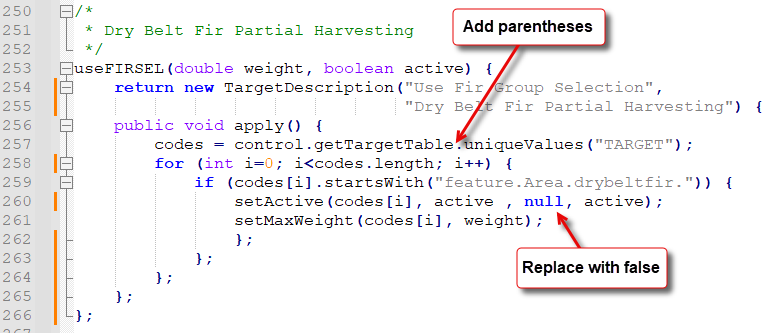
setActive("route.total.build", true, null, true); // now an error
Since null is not a valid yes/no value, BeanShell cannot find a matching method. The error message will say that the method was not found and list the argument types it was given, for example:
Command not found: setActive(String, boolean, Object, boolean)Fix: Replace null with false:
setActive("route.total.build", true, false, true);
The same rule applies to if and while conditions. A condition such as if (count) or if (name) will now fail with the message Condition must evaluate to a Boolean or boolean. Write the test out in full:
if (count != 0) ...
if (name != null && !name.isEmpty()) ...
3. Method calls need parentheses
Every method call must end with parentheses (), even if they are empty. Some scripts omitted them:
codes = control.getTargetTable.uniqueValues("TARGET"); // now an error
Without the parentheses, BeanShell treats getTargetTable as the name of a field rather than a method. Since there is no such field, the error message refers to an "undefined variable":
Attempt to resolve method: uniqueValues() on undefined variable or class name: control.getTargetTableFix: Add the parentheses:
codes = control.getTargetTable().uniqueValues("TARGET");
4. Misspelled names now cause errors
Some scripts compare a value against a fixed list of named options, such as a step type or an activity. If any of those names was misspelled or no longer exists, the old BeanShell did not raise an error; the comparison simply always evaluated to false. For example:
if (sd.getActivity() == ScenarioDescription.Activity.SOLVE &&
        sd.getStepType() == ScenarioDescription.StepType.OldStyle) {
    ...
}
In this case, OldStyle is not a valid StepType, so the code inside this if statement never ran. The script appeared to work, but that section was silently skipped. The new BeanShell will report an error naming the unknown value.
Fix: Use the correct name. In this example, it should be Singular:
if (sd.getActivity() == ScenarioDescription.Activity.SOLVE &&
        sd.getStepType() == ScenarioDescription.StepType.Singular) {
    ...
}
Be cautious with this one. Once the name is corrected, code that previously did not run will now run. This may change your results. Make sure the newly active code does what you intend.
Need help?
There may be other issues in your scripts that this article doesn't cover. If you run into an error you can't resolve, send us the script along with the full error message, and we'll help you sort it out.